


Jewel-Osco Deals & Delivery
4.78.47K Reviews
App Specs
- Version
- 2026.27.0
- Updated On
- License
- Free
- Downloads
- 1,000,000+
- Developer
- Albertsons Companies, Inc.
- Categories
- Shopping
- Platform
- Android, iOS
Screenshots
 Analysis by AppCompare
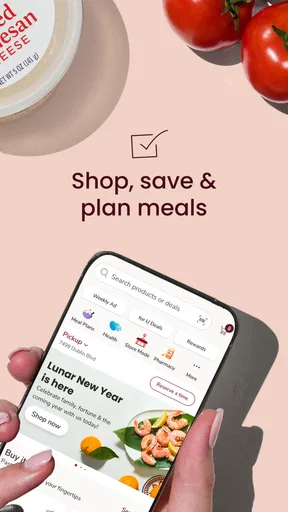
Buying groceries through a store app can sound like a small convenience, but the real test is whether it helps me finish a normal shopping trip without creating extra work. Jewel-Osco Deals & Delivery is built around that practical goal. It brings grocery shopping, digital deals, prescription refills, delivery, and pickup into one place, so I can plan an order from home instead of switching between several services.
I found it most useful when I already knew I would shop at Jewel-Osco and wanted to organize the trip before arriving. The app is free, available for Everyone, and developed by Albertsons Companies, Inc. It is a shopping app rather than a general marketplace, which matters: its value comes from connecting me with the Jewel-Osco grocery experience, not from offering an enormous selection of unrelated products.
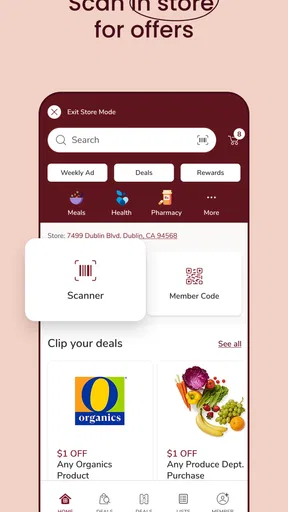
The store’s short description is simply “Jewel-Osco,” but that modest label hides a fairly broad routine. I can browse groceries, look for deals, clip digital coupons, arrange delivery or pickup, and handle prescription refills from the same account area. The strongest reason to install it is convenience across several parts of a grocery routine, not just online ordering.
What to expect before placing your first order
On opening the app, I would expect to spend a little time making it useful rather than immediately checking out. The experience depends on identifying the relevant Jewel-Osco shopping context, because deals, product availability, pickup choices, delivery options, and pharmacy tasks are all tied to the store service. A quick browse is possible, but the app makes more sense once I treat it as a personal shopping workspace.
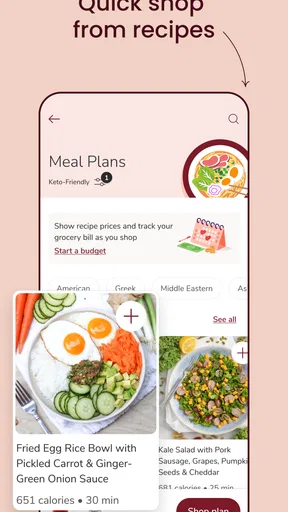
The main advantage over walking into the store with a paper list is preparation. I can look through products before leaving, review available offers, and decide whether pickup or delivery fits the day. That makes the app especially helpful for a weekly shop, a busy evening, or a household where another person needs to see what is being purchased before the order is submitted.
Compared with a broad grocery marketplace, Jewel-Osco Deals & Delivery feels more focused. A marketplace may be better when I want to compare several retailers in one screen. This app is the better fit when Jewel-Osco is already my preferred store and I want the store’s own deals and fulfillment choices in one place. That trade-off is important: I would not install it expecting a universal comparison tool.
The app has earned a 4.7 average from around 129 thousand ratings, with roughly 8.5 thousand written reviews and over one million installs. Those figures suggest that it is a familiar tool for many shoppers, but they do not remove the need to check the details of my own order. Grocery availability and fulfillment are practical matters, so I still review the cart carefully before confirming anything.
Worth Reading Before You Choose

EA SPORTS FC Mobile 26 Is a Bigger Football Game, but It Takes Time

Flipboard Shows What News Apps Must Do Beyond the Feed

Switching to Android Auto Means Rethinking Your Driving Routine

Google Calendar Makes a Crowded Week Easier to Manage

Ludo King Makes the Most of the Minutes Between Plans

Baby Panda World Brings Quick Play to Modern Phones, but Its Game Library Feels Busy
How the shopping flow fits a normal day
A realistic use case is a late afternoon when I realize I need ingredients for several meals but do not want to walk every aisle. I open the app, search for the items I need, review relevant deals, and decide whether pickup will save time or whether delivery is more convenient. If I am already near a store, pickup can turn the app into a planning tool rather than a replacement for the whole shopping trip.
Another useful situation is a repeat shop. I can use the app to rebuild a familiar grocery list instead of relying on memory. I still pay attention to package sizes and product variations, because a search result can contain several similar choices. The convenience comes from reducing the amount of browsing and remembering, not from removing the need to make decisions.
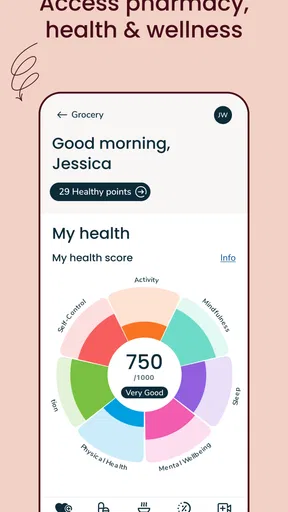
The pharmacy connection is also meaningful for people who already use Jewel-Osco for prescriptions. Having refill tasks alongside groceries may make the app more worthwhile than a separate coupon app. I would use that section for a specific refill need, then return to shopping, rather than assuming every pharmacy action belongs inside the grocery cart.
Setting up the app without making the first visit confusing
After installation, I would begin by signing in or creating the account the app requests for shopping and personalized activity. I would keep my first session simple: establish the store context, confirm the shopping method I want to test, and then search for one familiar item. Starting with a small task makes it easier to understand how the app presents products, offers, and fulfillment choices.
The app supports Android devices running version 8.0 or later. It is also available on iOS, so households using different phone platforms can still choose the same Jewel-Osco service. Because the app is free, the main commitment is not a purchase of the software; it is the time spent setting up an account and learning how the store’s digital shopping process is organized.
I recommend not beginning with a large weekly order. A first-time user has several things to learn at once: where deals appear, how coupons are clipped, how pickup or delivery is selected, and where prescription refills are handled. A small test order or a short list gives me a clearer view of the workflow and makes any correction less frustrating.
Three setup habits that save time later
- Choose the shopping method early. Decide whether the first goal is pickup, delivery, or preparing an in-store trip. This keeps the session focused and makes the final review more meaningful.
- Search by the exact item I normally buy. Familiar products reveal whether I am looking at the right size, variety, and brand before I build a larger cart.
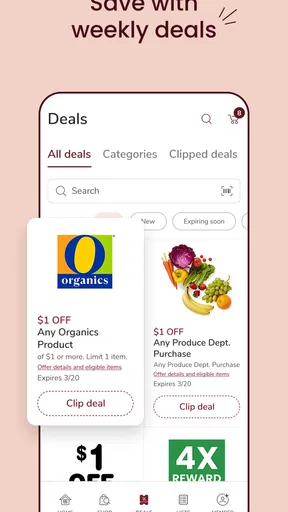
- Review deals before treating the list as finished. Clipping an offer is an active step, so I do not assume that merely seeing a promotion means it has already been applied.
That last habit is one of the app’s most important practical details. Digital coupons are useful only when I remember to clip them and then check the order summary. I prefer to think of deals as part of the planning stage, not as a surprise discount that will automatically appear after checkout.
What the first screen is really for
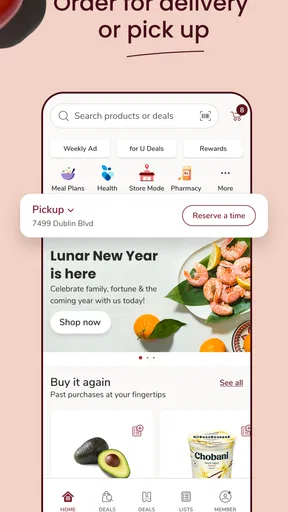
For a new user, the first screen should be treated as a starting point rather than a complete grocery plan. I look for the path to products, the area for deals, and the controls for delivery or pickup. I also keep the pharmacy option in mind, but I do not mix it into the grocery workflow unless I have a refill to manage.
This separation helps because the app serves more than one purpose. Someone installing it only for coupons may overlook the ordering tools, while someone interested in delivery may not notice the prescription function. I get better results when I choose one objective per session and use the other sections when they become relevant.
Getting to the first meaningful success
My recommended first success is not placing the biggest possible order. It is finding a familiar grocery item, clipping a relevant deal if one is available, and building a short cart that can be reviewed calmly. That sequence teaches the essential relationship between browsing, offers, and fulfillment without making the first experience feel like a complicated project.
I would begin with a few staples I know well. After adding them, I would inspect the cart for product descriptions and quantities, then check whether the selected shopping method remains appropriate. This is where the app becomes more than a digital flyer: it connects the item search with an actual plan for receiving or collecting the groceries.
When I choose pickup, I think of the app as a time-saving bridge between planning and visiting the store. I can prepare the list at home and make the final trip more focused. When I choose delivery, I value not having to travel, but I become even more careful about the cart details and the final order review. The best option depends on whether my priority is avoiding the store, avoiding extra waiting, or simply organizing the list.
A useful workflow for a larger shop is to divide it into passes. First, add essentials. Second, look for deals and clip the ones that match the planned purchases. Third, review quantities and substitutions or availability information shown during the ordering process. Finally, confirm the fulfillment choice. This is less exciting than adding items quickly, but it reduces the chance of overlooking a practical detail.
How to use deals without letting them control the cart
The deals section can change the way I shop, but I try not to let a promotion create unnecessary purchases. I start with what the household actually needs, then use coupons to improve that list. This approach is especially helpful when the app presents several tempting offers and I want to avoid turning a routine grocery order into an unplanned spending exercise.
I also distinguish between seeing a deal and using a deal. The useful action is to clip the offer and then verify that the qualifying product is in the cart. Similar packaging, sizes, or flavors can make an item look right while failing to match the offer’s requirements. The app makes digital savings more accessible, but I still have to read the offer and connect it to the correct product.
For repeat shopping, I would keep a mental note of which promotions genuinely helped. If a deal applies to something I buy regularly, the app becomes more valuable over time. If I find myself adding products only because they are highlighted, I would scale back and use the app mainly for list building and fulfillment.
Prescription refills deserve their own workflow
The prescription refill feature is convenient for people who already rely on Jewel-Osco’s pharmacy, but I would approach it separately from grocery shopping. A refill request is a health-related task, so I would check the medication and pharmacy details carefully rather than rushing through it while assembling a food order.
This is one of the app’s less obvious strengths: it can bring two recurring errands into one routine. I might handle a refill request first, then create a grocery pickup order for the same general trip. That can reduce the number of apps and reminders I need. Still, I would not assume that a grocery order and a prescription request have identical timing or status steps; I would follow each section’s instructions independently.
Where first-time users may hesitate
The biggest source of confusion is likely the difference between browsing, saving a deal, and completing a purchase. These are separate actions. A product can be visible without being in the cart, a promotion can be displayed without being clipped, and a cart can be ready without a pickup or delivery choice being finalized. Remembering those distinctions makes the app feel much more predictable.
Another point of friction is product selection. Grocery searches often return close alternatives, and I do not rely on the first result automatically. I check the item name, size, and description before adding it. This matters most for pantry staples, dietary products, and household goods where a small difference can make the purchase unsuitable.
Availability can also affect the experience. A product that appears during browsing may not be the best choice for the selected store or fulfillment method at the moment I place the order. For that reason, I treat the final cart review as essential rather than optional. If an item is important to a recipe or a specific household need, I would not wait until the last screen to notice that the available option has changed.
Delivery and pickup are not interchangeable in practice. Delivery is attractive when I cannot make the trip, while pickup can be preferable when I am already passing the store or want more control over when I collect the order. I choose based on the day’s schedule, not simply on which button looks fastest. The app gives me the choice, but it cannot make that personal trade-off for me.
Who will appreciate it most
I would recommend Jewel-Osco Deals & Delivery to regular Jewel-Osco shoppers, families managing recurring grocery lists, people who actively use digital coupons, and customers who want grocery and pharmacy tasks close together. It is also a sensible choice for someone trying pickup or delivery for the first time because the app keeps those services connected to a familiar grocery retailer.
I would be more cautious about recommending it to someone who shops at many different chains and mainly wants a single tool for comparing every store. That person may prefer a broader grocery service. I would also skip it if I had no reason to use Jewel-Osco, since the app’s usefulness is tied to that retailer rather than to general grocery discovery.
Shoppers who dislike account-based digital coupon systems may find the setup and clipping steps annoying. In that case, in-store shopping with a paper list may feel simpler. The app is at its best when I am willing to spend a few minutes planning in exchange for a more organized trip.
My next-step routine after the first order
Once I understand the basics, I would use the app in short, repeatable sessions instead of waiting until the entire household list becomes urgent. I might check deals before a planned shop, add staples as I remember them, and use pickup or delivery when the schedule calls for it. This turns the app into a running grocery assistant rather than a tool I open only during a rushed checkout.
I would also keep the app updated. The current version is 2026.27.0, and using the current release is sensible for an app that handles shopping workflows, deals, and pharmacy-related tasks. I would not expect an update to eliminate every store-level issue, but staying current gives me the best chance of seeing the intended interface and fixes.
The app’s age rating is Everyone, which fits its everyday shopping purpose. That does not mean every task should be handled casually: prescription information and payment decisions still deserve attention. I use the simple interface for convenience, while keeping the same care I would use with any health or purchase-related service.
My final opinion is positive, with a clear condition. Jewel-Osco Deals & Delivery is most valuable when Jewel-Osco is already part of my routine and I want one place for deals, ordering, pickup, delivery, and refills. It is not the right replacement for a multi-store comparison service, and digital coupons require active participation. But for a first-time user who starts with a small list, checks the item details, clips relevant offers, and reviews the fulfillment choice, the path to a useful first result is straightforward.
I would recommend installing it before the next planned grocery trip rather than during a last-minute rush. Give the app one focused job, complete that job carefully, and then add the other tools as they become useful. That approach makes its strengths visible without turning grocery shopping into another complicated digital chore.
Pros
- Weekly deals and digital coupons help reduce grocery costs.
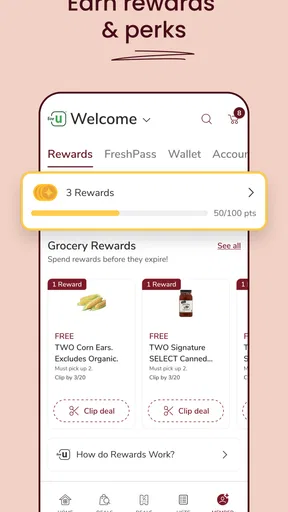
- Rewards can be applied automatically when your account is linked.
- Order groceries for delivery or convenient store pickup.
- Shopping lists make it easier to organize recurring purchases.
- Product search saves time when planning a larger grocery order.
Cons
- Some promotions require minimum purchases or specific loyalty conditions.
- Delivery availability
- fees
- and time slots vary by location.
- Prices and product availability may differ between stores.
- The app may request location and account permissions for full access.
- Substitutions can occur when selected items are out of stock.
FAQs for Jewel-Osco Deals & Delivery
What is Jewel-Osco Deals & Delivery?
Jewel-Osco Deals & Delivery is the official shopping app for finding weekly savings, digital coupons, personalized offers, and grocery delivery or pickup options from participating Jewel-Osco stores. After signing in, shoppers can browse products, build a shopping list, clip eligible deals, and place an order. Availability, pricing, promotions, and services may vary depending on your selected store and location.
Do I need a Jewel-Osco account to use the app?
You can usually browse stores, products, and some promotions without completing a full account setup, but an account is generally required to clip digital coupons, save personalized deals, manage a Jewel-Osco loyalty profile, and place delivery or pickup orders. Signing in also helps the app connect purchases and eligible savings to your loyalty information. Make sure your account details are accurate before checkout.
How do digital coupons and Jewel-Osco deals work?
Digital coupons and personalized offers typically need to be clipped or added to your account before shopping. When you enter your registered loyalty information at checkout, eligible discounts should apply automatically, subject to product limits, expiration dates, size requirements, and other terms. Some offers cannot be combined, so review each coupon’s conditions in the app before relying on a specific discount.
Does Jewel-Osco offer grocery delivery and pickup through the app?
The app may support grocery delivery, curbside pickup, or in-store shopping tools, depending on the services available at your selected Jewel-Osco location. You can choose an available time slot, add products to your cart, and review estimated fees and substitutions before submitting the order. Delivery areas, minimum order requirements, service charges, and scheduling availability can change by store and demand.
Are prices, fees, and product availability the same in the app as in the store?
Not always. Product availability, promotional pricing, delivery fees, pickup charges, taxes, deposits, and substitution policies may differ according to your store, fulfillment method, location, and order time. The app normally displays an estimated total before checkout, but the final amount can change if items are weighed, replaced, removed, or repriced. Always check the order summary and applicable terms before confirming.


